Looking for a font combination that makes your blog look polished without spending a penny? You're in the right spot. Pairing Abril Fatface with clean body fonts like Open Sans or Lato gives your blog a strong visual identity and all three fonts are available free through Google Fonts. This combination works because the bold, decorative serif of Abril Fatface draws attention to headlines while the sans-serif body fonts keep long-form content easy to read. If you've been staring at font options and feeling stuck, these pairing examples will save you hours.
What Makes Abril Fatface a Good Headline Font for Blogs?
Abril Fatface is a display serif typeface inspired by heavy titling fonts from 19th-century advertising posters. It has thick strokes, high contrast, and a slightly condensed shape that commands attention. For blog headers, this means your post titles stand out immediately when someone lands on the page.
The key thing to understand: Abril Fatface is not meant for body text. Its thick, decorative letters become hard to read at small sizes. You use it for headlines, hero text, section titles, and pull quotes. For everything else, you need a clean companion font which is where Open Sans and Lato come in.
Why Do Open Sans and Lato Work So Well With Abril Fatface?
Good font pairing follows one core rule: contrast without conflict. Abril Fatface brings the drama as a serif display font. Open Sans and Lato are both humanist sans-serif fonts designed for screen readability. The contrast between the ornate headline font and the clean body font creates visual hierarchy readers know exactly where to look first.
Here's why these two body fonts specifically work:
- Open Sans has a neutral, friendly appearance with open letterforms. It renders crisply on screens at all sizes and supports a wide range of languages. Its slightly rounded shapes feel approachable, which balances the boldness of Abril Fatface nicely.
- Lato carries a bit more personality with its semi-rounded details and strong structure. It feels slightly warmer than Open Sans and pairs well when you want your blog to have a touch more character in the body text.
Both are available on Google Fonts, load quickly, and have multiple weights giving you flexibility for subheadings, captions, and body copy without adding another font to your stack. If you want to explore more serif-sans combinations, check out these responsive typography pairings using Abril Fatface.
What Do These Pairings Actually Look Like on a Blog?
Example 1: Abril Fatface + Open Sans
This pairing feels classic and trustworthy. Use Abril Fatface at 32–48px for blog post titles, Open Sans Regular at 16–18px for body paragraphs, and Open Sans Semi-Bold at 20–24px for subheadings. The result is a clean reading experience with strong visual entry points.
Best for: Lifestyle blogs, recipe sites, travel journals, and personal blogs where readability is the top priority. The neutral tone of Open Sans lets the personality of your writing and images do the talking.
Example 2: Abril Fatface + Lato
This combination has a slightly more editorial feel. Lato's semi-rounded letterforms give the body text a bit more warmth, which works well for blogs that lean into storytelling. Use Abril Fatface at 36–50px for feature article titles, Lato Light or Regular at 16–18px for body text, and Lato Bold at 18–22px for subheadings.
Best for: Fashion blogs, design portfolios, editorial magazines, and any blog where you want a slightly more refined feel without sacrificing readability.
Example 3: Abril Fatface for Pull Quotes With Open Sans or Lato Body Text
You don't have to limit Abril Fatface to just the main headline. Using it for pull quotes or featured callouts within a blog post adds visual variety and breaks up long blocks of text. Set pull quotes at 24–30px in Abril Fatface and surround them with Open Sans or Lato body text at 16–18px. This approach keeps the page dynamic without introducing a third font.
For more inspiration on luxury-style applications, take a look at these serif headline pairing ideas for upscale brand websites.
How Should You Set Up These Font Pairings in CSS?
Load both fonts from Google Fonts with the weights you actually need. Don't load every available weight it slows down your page. A typical setup looks like this:
For the Abril Fatface + Open Sans combination, load Abril Fatface (400) and Open Sans (400, 600, 700). For Abril Fatface + Lato, load Abril Fatface (400) and Lato (300, 400, 700). Set your headline font-family to 'Abril Fatface' and your body font-family to 'Open Sans' or 'Lato' with a sensible fallback like Arial or Helvetica.
Keep your line-height between 1.5 and 1.75 for body text. Headlines in Abril Fatface usually look best with a line-height of 1.1 to 1.2 since the letters are already tall and dramatic. If you need a deeper walkthrough on responsive implementation, we covered that in our guide on pairing Abril Fatface with Google Fonts for responsive design.
What Mistakes Should You Avoid With This Font Pairing?
- Using Abril Fatface for body text. It looks great big, but at 14–16px it becomes nearly unreadable. Save it for headlines and display sizes only.
- Using both Open Sans and Lato together with Abril Fatface. These two sans-serif fonts are too similar. Pick one for your body text and stick with it. Adding both creates visual noise without adding hierarchy.
- Loading too many font weights. Each weight is an additional HTTP request and file download. Pick 2–3 weights per font and call it done.
- Ignoring mobile sizing. Abril Fatface at 48px on desktop might look perfect, but it can overwhelm a small screen. Scale it down to 28–32px on mobile and test it.
- Setting too tight a letter-spacing on headlines. Abril Fatface's thick strokes need breathing room. Default letter-spacing is usually fine, but if anything, add slight positive spacing (0.5–1px) rather than pulling letters closer.
How Do You Choose Between Open Sans and Lato for Your Blog?
Both are strong choices, so the decision often comes down to the tone of your blog content.
Choose Open Sans if you want maximum neutrality. It doesn't impose a mood it just works. This makes it a safe, reliable choice for blogs covering multiple topics or for client work where you need broad appeal.
Choose Lato if you want a slightly more distinctive body text. Lato's personality is subtle but present, and it pairs especially well with Abril Fatface when you're building an editorial or magazine-style blog layout.
When in doubt, set up both versions side by side with your actual blog content. Real text reads differently than "Lorem ipsum" your final choice should be based on how your words look, not how sample text looks.
Quick-Start Checklist for Your Blog
- Go to Google Fonts and add Abril Fatface (400) plus Open Sans (400, 600) or Lato (400, 700) to your selection.
- Copy the embed link and add it to your blog's
<head>section or theme settings. - Set your
h1,h2, andh3tags to Abril Fatface with a line-height of 1.1–1.2. - Set your body text to Open Sans or Lato at 16–18px with a line-height of 1.5–1.75.
- Test on mobile. Scale down headline sizes if they dominate the screen.
- Read a full blog post on your site with the new fonts. If your eyes get tired, adjust size or line-height.
- Publish one post with the new pairing and check page speed font loading should add less than 200ms.
These three free fonts give you a professional-looking blog without any design budget. Start with one pairing, publish a few posts, and adjust based on what your readers actually engage with. The best font combination is the one your audience reads comfortably and keeps coming back to.
 Best Font Pairing with Abril Fatface for Modern Web Design
 Abril Fatface Font Pairing Guide for Responsive Google Fonts Typography
 Best Abril Fatface Sans Serif Font Pairings for Modern Websites
 Abril Fatface Serif Font Pairing Ideas for Luxury Brand Web Design
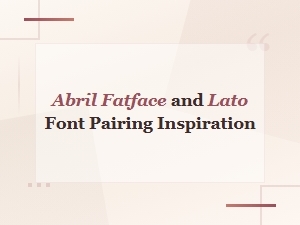 Abril Fatface and Lato Font Pairing Inspiration and Ideas
 Abril Fatface Font Pairing Ideas for Luxury Brand Logos